
Creating a Multimedia Tech Puzzle for New Cyber Talent
CLIENT
JIVC
ROLE
Concept, Art Direction and Lead Design
PRODUCT
Augmented Reality Solution
To keep new hires engaged during the three-month security screening period, JIVC (Dutch Ministry of Defence) wanted an interactive pre-boarding experience. The solution we created was a mysterious welcome package containing a Raspberry Pi that guided new employees through a tech puzzle and an immersive AR experience introducing JIVC’s projects.

client
JIVC is the IT department of the Dutch Ministry of Defence and is expecting to have 1100 new jobs in the next few years. However, because of its sensitive nature every employee must go through an extensive background check. This causes a lag time of an average of three months between the moment the employee signs their contract and their actual first day at work.
Research has shown that most employees will quit their job in the first few months, so it is important for JIVC to keep the new employees engaged with the brand and proud to be a part of the company. They wanted to achieve this by providing a pre-boarding program.
Concept
The concept for the pre-boarding program was to use JIVC ground-breaking IT projects to excite the employee about their prospective role within the company.
Furthermore, we wanted the pre-boarding program to be interactive, highly tech driven and present a challenge, as we know that anyone who has affinity with tech likes to problem solve. It was these three components that served as the inspiration in creating the pre-boarding program.
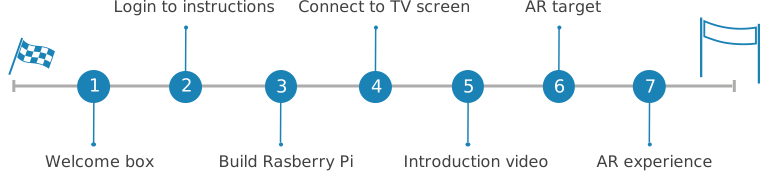
Step 1: Welcome box
Two weeks after signing their contract the employee will receive an unexpected package at their home. The image of the box has a dark tech feel with the words: Are You Ready? We wanted to make the box mysterious in order to represent the discreet nature of JIVC.
Step 2: Login to receive instructions
When the employee opens the welcome box he or she will find a Raspberry Pi, a SD card, a HDMI cable and instructions to go to a designated website.
Step 3: Build Raspberry Pi
When the employee visits the designated website, he or she will receive a step-by-step tutorial on how to install a specific program on the Raspberry Pi.
Step 4: Connect to TV screen
Once the program is installed on the Raspberry Pi the employee will be shown how to connect it to the TV screen.
Step 5: Introduction Video
Once the Raspberry Pi is connected to the TV screen, a video will start where the host welcomes and congratulates the viewer for completing the task. The video will proceed to give a highly dynamic introduction to the innovative projects JIVC is working on.
Step 6: Augmented Reality target
At the end of the video the same host will appear and invite the employee to start the AR experience. The video will end with the AR target where the employee will find a three-step instruction on how to scan this target and open the AR experience.
Step 7: Augmented Reality experience
Once the target is scanned, the TV screen transforms into the AR experience. The employee is welcomed into the AR experience by the same hosts while standing on a 3D map of the Netherlands. Surrounding the host are flying jet fighters, naval ships, and armoured vehicles. Each of these objects represent a real-life JIVC project. The employee can select one of these objects to open an interactive experience of the specific project and learn how JIVC is making a difference.